Case Study – Resort Operations Companion App

Cielo Management – Resort Operations Companion App

A staff-facing operations app built around the Cielo Alto Place resort website, giving hotel staff focused tools for booking lookup, manual reservations, protected rebooking, room mapping, check-in preparation, reporting, and in-app documentation.

Built for resort staff who need clear daily workflows instead of broad website administration screens.
ReservationsRoom MappingReporting
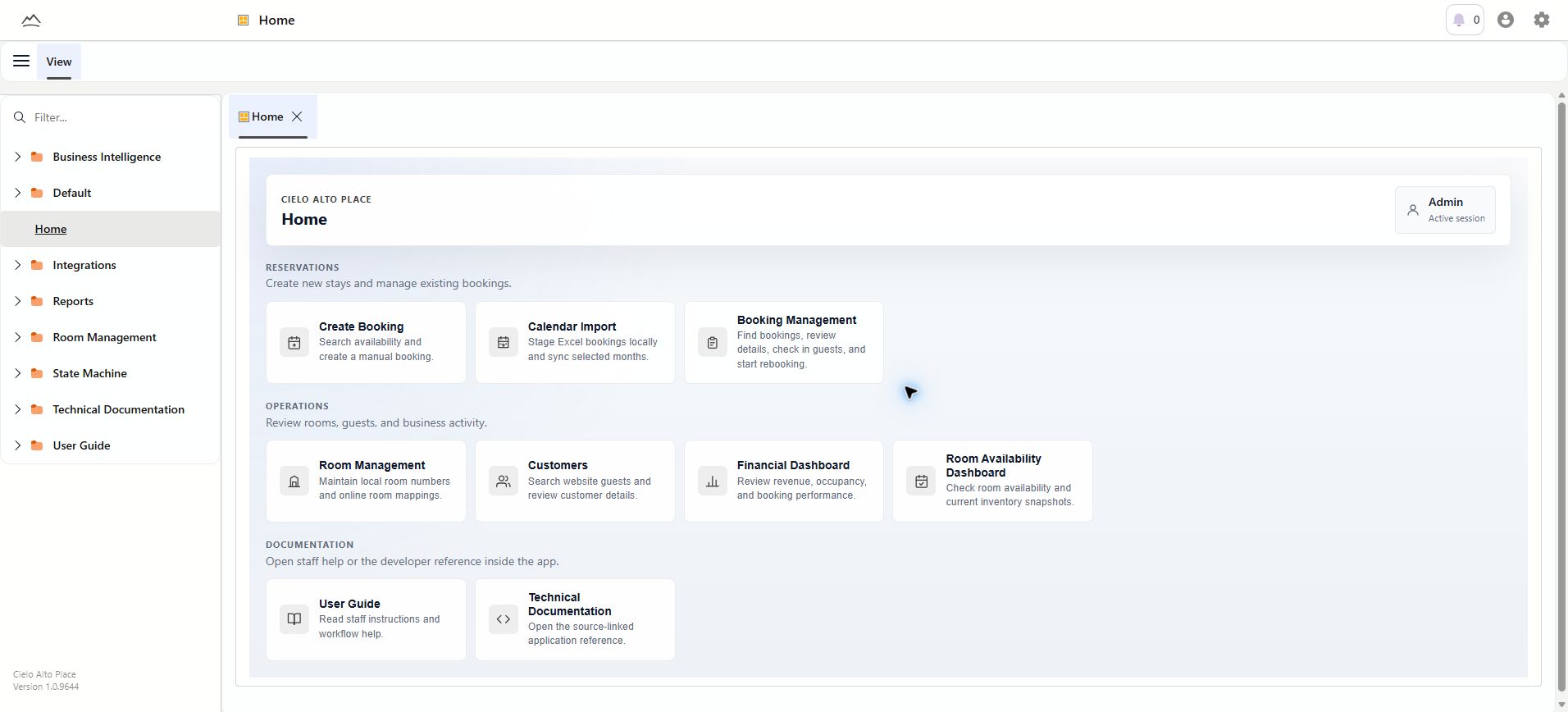
Cielo Management staff home workspace with reservation, operations, and documentation shortcuts

The home workspace gives staff a focused starting point for high-frequency resort operations.

Problem

The resort website could accept guest reservations, but staff still needed a clearer workspace for daily booking work: finding reservations, creating manual stays, moving dates safely, tracking payment requests, assigning rooms, and reviewing performance.

Solution

Cielo Management became the staff operations layer around the website, giving the team guided workflows for reservations, rooms, customers, imports, dashboards, and documentation without making staff work inside broad admin screens.

My Role

I designed and built the app workflow, screen structure, data handoff with the resort website, staff booking process, room mapping tools, reporting views, validation behavior, and staff user guide.

What The App Does

The app organizes daily resort operations into clear modules for booking work, room inventory, imports, customer lookup, management reporting, and staff guidance.

Booking Management

Search reservations, open booking details, review guest and room information, inspect payment status, start rebooking, and complete date-gated check-in actions from one booking context.

Manual Staff Booking

Search available dates, accept recommended rooms, enter guest details, create a pending reservation, and surface the payment request result in the same workflow.

Calendar Import

Stage Excel activity-calendar rows locally, review by check-in month, correct details, map rooms, skip rows when needed, and sync only when rows are ready.

Protected Rebooking

Move reservations through a guided flow that checks new dates, separates recommended, upgrade, and downgrade options, confirms the change, and preserves the original booking if processing fails.

Room Management

Map online rooms to the internal room types and room numbers staff use on property, with sync controls and read-only change history for safer room operations.

Customer Search

Search guests by name, email, or phone, open customer details, and review related bookings without starting from a reservation number.

Business Dashboards

Review revenue, bookings, occupancy signals, upcoming check-ins, room usage, exports, and print-ready summaries from reporting snapshots.

Staff Documentation

Keep booking, room, reporting, and support instructions inside the same system staff use every day.

Workflow Highlight

Search first, act second.

Reservation work begins with lookup and availability checks so staff see the booking context, guest details, room choices, and payment state before making changes. Manual bookings start with dates and guest count, then guide staff toward available room recommendations.
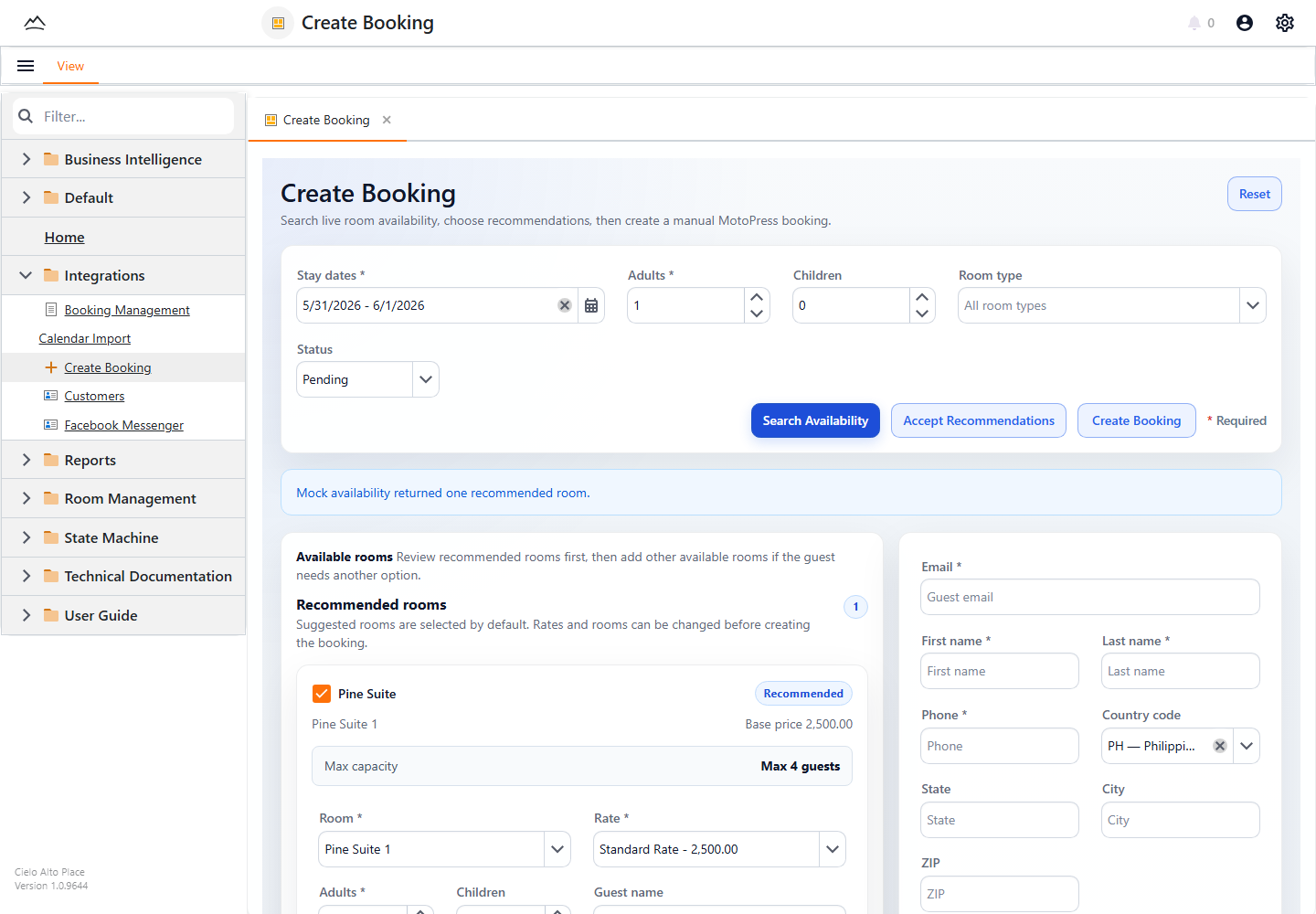
Cielo Management create booking workflow with room recommendations and guest details

The Create Booking workflow recommends available rooms before staff enter guest information and create the reservation.

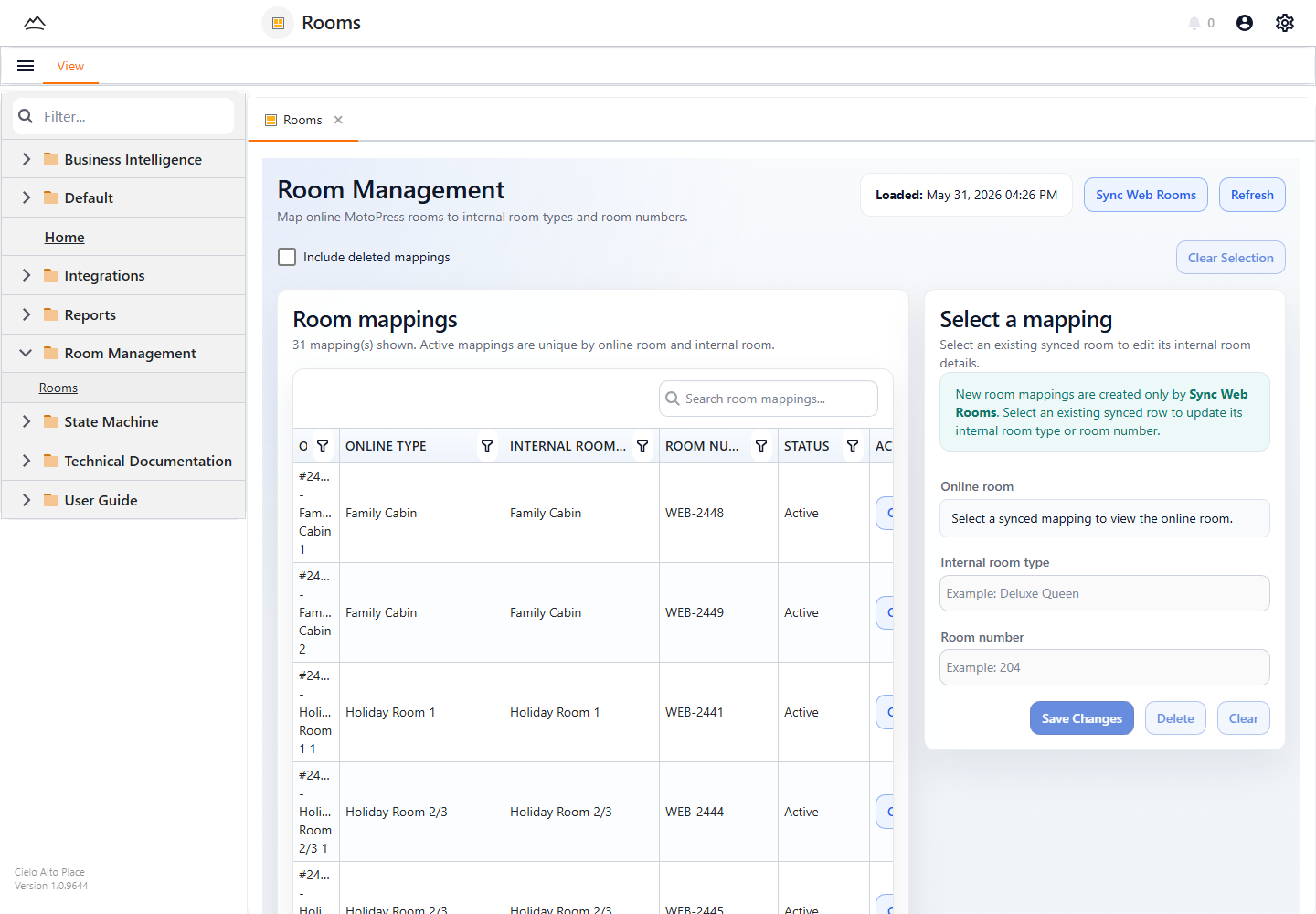
Cielo Management room management workspace with online room mappings and edit panel

Room Management connects online rooms to internal room numbers while preserving a cleaner operational view for staff.

Operations Mapping

Room assignments match how the resort actually works.

The app connects online room records to the labels the resort team uses day to day. That makes check-in preparation, availability review, and operational handoffs easier to understand without exposing staff to unnecessary website internals.

Manager-ready dashboards

Dashboards turn reservation and payment activity into summaries managers can filter, export, print, and use for operational decisions.
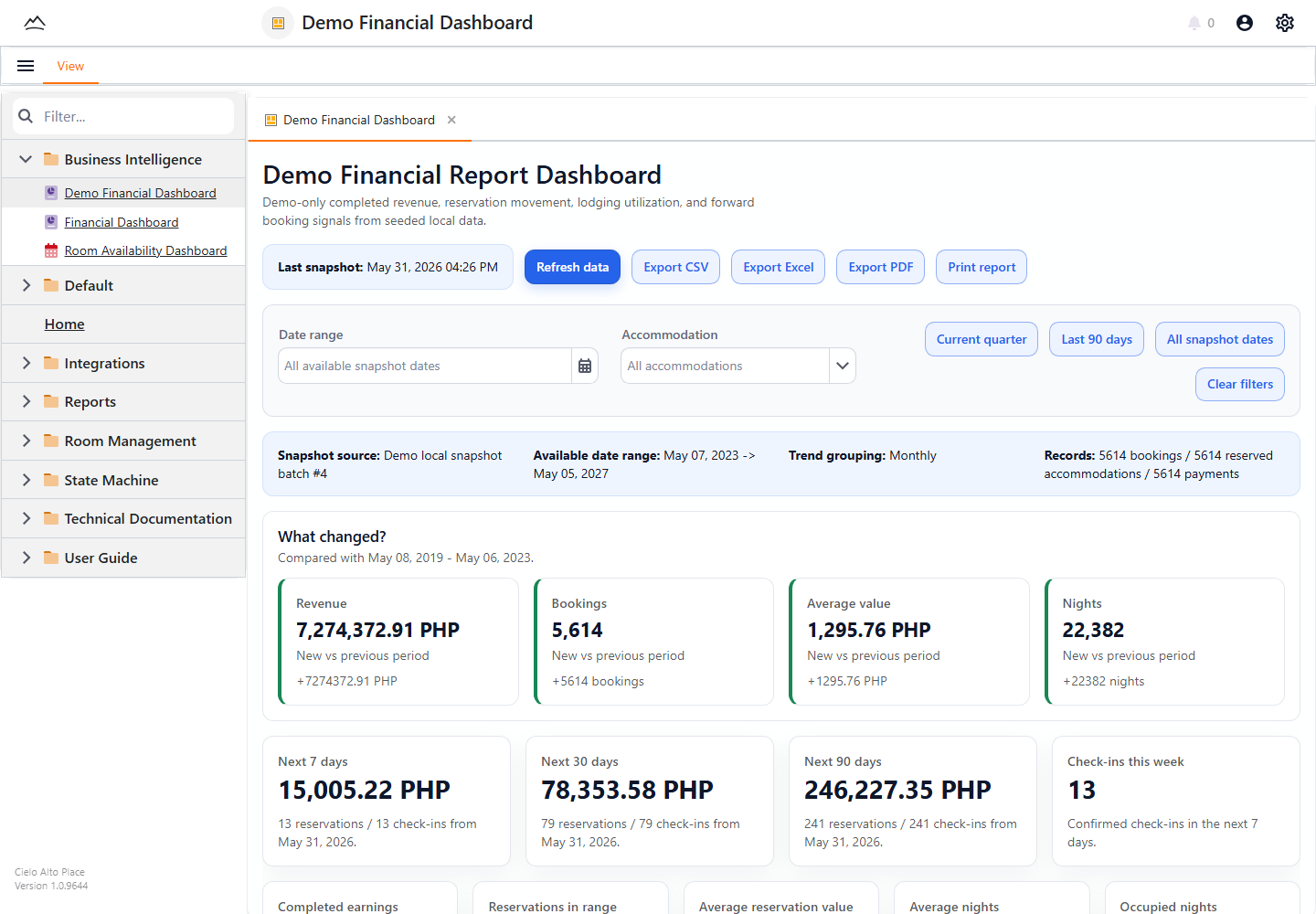
Cielo Management financial dashboard with revenue, bookings, and upcoming reservation signals

The financial dashboard summarizes completed revenue, booking movement, upcoming check-ins, and lodging performance.

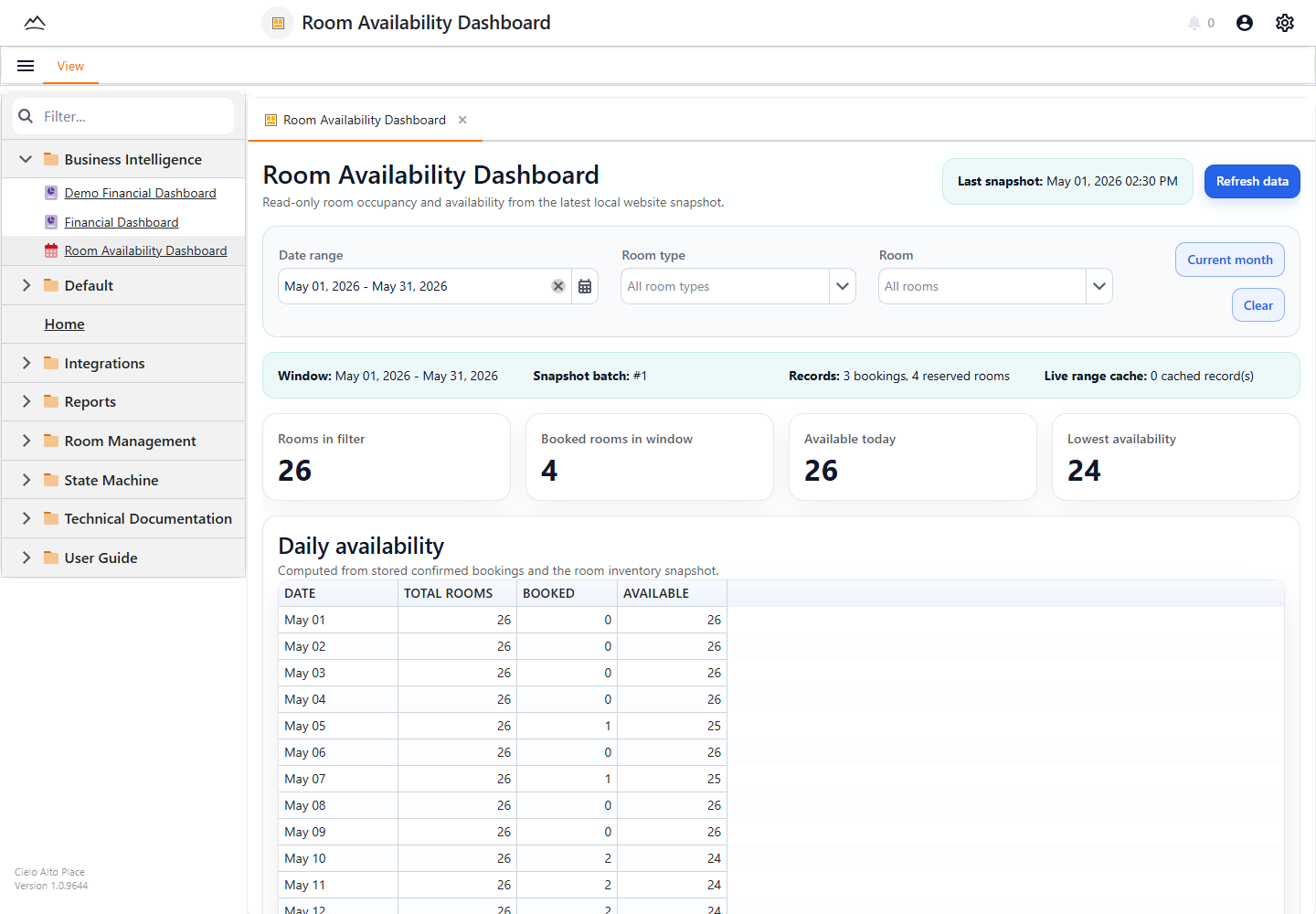
Cielo Management room availability dashboard with daily room counts and booked room window

The room availability dashboard turns inventory and confirmed stays into a day-by-day view of available and booked rooms.

How It Works With The Resort Website

The Cielo Alto Place website remains the guest-facing storefront for room discovery, online reservations, account access, and payments. Cielo Management sits beside it as the staff workspace for the operational work that happens after, around, and because of online bookings.

Guest Website

Guests browse rooms, search dates, reserve stays, manage eligible changes, and complete payments through the public resort website.

Staff App

Staff create manual bookings, inspect reservations, rebook guests, map rooms, check availability, import calendars, review guests, and read workflow guidance.

Shared Operations

Reservation, room, guest, payment, and reporting workflows stay connected so the website and staff app support the same resort operation.

Staff Enablement

Help lives inside the app.

An in-app user guide explains booking, room, reporting, and support workflows in plain staff language. Procedures stay close to the screens where the work happens, reducing handoff friction and making new workflows easier to train.
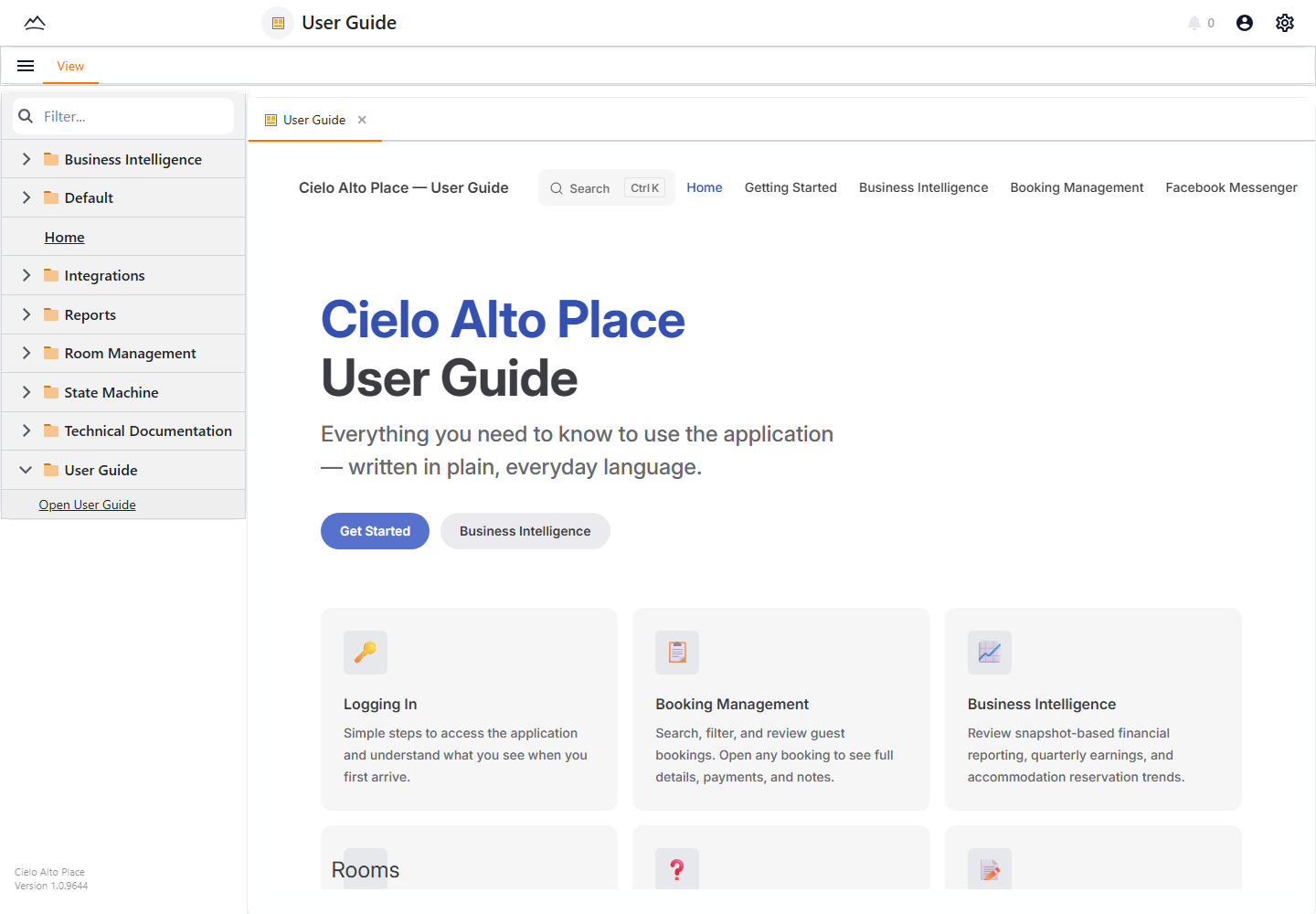
Cielo Management in-app user guide with staff workflow cards

The in-app user guide documents the same workflows staff use every day.

What This Shows I Can Build

This project demonstrates internal software that turns complex business operations into readable, guided workflows for staff and managers.

Operations-Focused Apps

Focused daily workflows for staff, managers, and service teams.

Reservation Workflows

Availability, customer records, staff-entered stays, payment requests, and safer reservation changes.

Reporting For Decisions

Revenue, occupancy, availability, export, and print views managers can actually use.

Staff-Ready Delivery

Readable screens, validation, training documentation, and QA across responsive presentation.

Reservation OperationsManual Staff BookingProtected RebookingRoom MappingCalendar ImportFinancial Reporting

Screenshots use sanitized or demo Cielo Management views from the local application environment. They demonstrate the workflow and interface without exposing private guest booking details.